Reduce distractions, organize tasks, coordinate teams and projects, and boost productivity with these simple, free, and low-cost time-management apps.
Table of Contents

Simple Tools to Boost Productivity Without Breaking the Bank
If you’re like me, you’re always looking for tools that can help boost productivity without breaking the bank. Distractions like meetings and social media can make it difficult to be productive. So I investigated some free and low-cost time management apps, and what I found can be productivity lifelines.
 Milanote: A Simple Way to Boost Productivity

First up is Milanote. I’ve previously boasted about Milanote on Facebook, but I love it so much that I’m highlighting it here. Milanote is like a pro chef knife or high-quality hammer, but without the premium price tag. Milanote is a simple tool that’s affordable, yet incredibly effective. Upload images from your computer or import from the internet; add text, lists, notes, and comments; manage your to-do lists; and color-code items. All in an easy-to-use, visual board layout with drag-and-drop functionality. Milanote also has a smartphone app that transfers notes, lists, and images to and from your computer in a snap.
Google Keep: Your Note-Taking Friend in Google Docs
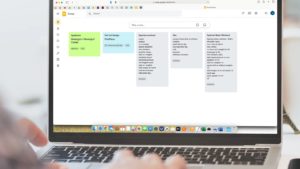
In my quest to find ways to boost productivity, I came across another strong, free option in the form of Google Keep. Have you ever had a great idea but didn’t want to stop to write it down? Worse, have you ever forgotten something because it wasn’t documented? Google Keep might be the solution. It is part of the Google Docs family, and I’m impressed with this tool’s clean design and simplicity. Keep lets you take notes by issuing voice commands or typing, organize those notes, and set reminders. It also has sharing features and a method to recover notes if you delete them too early.
Serene: Simple Name, Ample Offerings
An option for macOS users, Serene has a simple name, but that doesn’t mean it’s lacking in features. Arguably the most comprehensive solution covered in this article, Serene offers a website blocker, app blocker, day planner, and a to-do list, among other tools. Serene can also silence your phone and play focus-boosting music. You can try Serene for free, with affordable post-trial options starting at only $4 per month, offering infinite value given all that Serene can do.
Trello: Take Your Team Up a Notch

Offering free and low-cost plans, Trello is a time-management app that helps boost productivity with team settings. Its Butler feature handles workflow automation through rule-based triggers and calendar commands. Team members can also track their tasks. Trello has an inviting, simple design and allows the user to shift from project to project. You can create a board for each project, and within each board create cards to track tasks and status. Think of Trello as a simple, virtual, organized whiteboard.
Toodledo: A Customizable, Free Time-Management App

With perhaps the most fun name on this list, Toodledo is a seriously powerful productivity booster. Investigating this app yielded a wide range of work styles, meaning Toodledo is customizable to a high degree. It allows users to either focus on just one or two features, or incorporate many of them into a complex workflow. Even better, Toodledo syncs across devices, and has also has a neat alarm system. If you use its location feature, it triggers reminders when you approach a location where you have a task to complete. Toodledo’s additional features include scheduling, tracking time, statistics, and collaboration.
Wrapping Up
Depending on your needs and tastes, it’s a good bet that at least one of these free and low-cost time-management apps can help you stay productive. So go out and give one a try.
And if you’ve already tried one of these apps, what did you think?
